Posts

Showing posts with the label Tech Tip

Tech Tip: Getting Started with Diigo

Hey Everyone! This is my last tech tip for the semester. I decided to learn about Diigo. I have actually never heard of this before starting the class. I started to play with the extension a couple of weeks ago. Now, I will never go back. I cannot imagine life without all of my bookmarks. This past week, I have created the account (which is really easy to do). I will attach the instructions below if any of you are interested in creating your own account. Overall, I would suggest to get it because it just adds more organization to the mess of online sources. To Create Your Own Account Click HERE

Tech Tip Week 14: Canvas App

Hey Everyone! This week I decided to get connected and download the Canvas App. I have attended OU for the past four years and I have seen the transition to Canvas. At first it was hard, but now I like the platform compared to D2L. For some reason, I never knew that they had an app. If you are a nerd like I am, I check my grades and assignments constantly. After downloading the app, I found it very easy to use. I highly recommend getting the app, if you use canvas as much as I do.

Tech Tip: Youtube

Image
Youtube has become such an important outlet in today's society. So, it only makes sense to utilize Youtube within the assignments of this course. I have not used a Youtube video for any of my assignments for this class because I never knew it was an option. But, I will start finding videos in the future! I would recommend embedding a video to your posts because, not only is it fun, but it helps the reader understand your topic in a different way. For more information about how to embed a Youtube video to your blog, please refer you this page . Here is a video just for fun! I hope you enjoy :)

Tech Tip: Browser Bookmarks

This is arguably one of the most important tech tips out there. An online bookmark is so important when taking an online lecture, or even a lecture on campus. When looking up resources, you can simply save your source or webpage to a folder to look at it again later. I personally have a "college" folder on my Google Chrome Brower. This folder holds more files for each of my classes during the semester. It makes it so easy to navigate to refer back to old webpages for the course. I would recommend to create a subfolder for each class. This will save a lot of time to find what webpage you are looking for. If you are unclear how to make a bookmark on your browser, please click the link for more information.

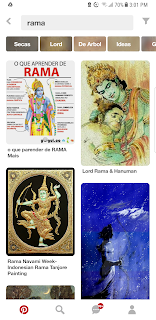
Tech Tip: Pinterest Search

Image
Pinterest is arguably the best app ever created. I use this app daily. It is a very good platform to get inspiration for different projects. Once this class started, I realized that I could use this app for this class as well. I suggest using the search bar for looking up more details or guides about Rama. Or, if you do the extra credit, you can look up memes. As an example, I have included a screenshot of me using the search bar to look up images of Rama that I could include in my later blog posts. It was super simple and easy to use. The app also gives suggestions to other topics that I would be interested in as well. Personal Screenshot of Pinterest Search of Rama

Tech Tip: Blogger Template

This week, I have experimented with the template of my blog. I originally went for the basic design at first. Once I discovered that I would change the template, I spent a day looking at the designs. After looking and testing a few different options, the pink design matched with the theme that I am wanting to have for this course. I hope that you all are able to find a design that you enjoy. If you have any questions, please just leave a comment.